The Copilot Ecosystem Explained (Without the Jargon)
After getting to know what Copilot is in Episode 1, Episode 2 invites you to dive into its wider ecosystem—unpacking the different versions, where they live, and how each one actually helps you.
This is the part most SMEs find confusing, and honestly, it’s not your fault. Microsoft uses the word “Copilot” to describe several different products. Today, we cut through that confusion.
By the end of this episode, you’ll know:
* The 2026 Copilot lineup
* The critical difference between consumer and business Copilot
* Which version actually protects your business data
* What you need before you can even buy it
🧩 The Copilot Ecosystem at a Glance
In 2026, we can categorise Copilot into three main “worlds.” You could say each one fits a different level of need.
1️⃣ The “Public” World: Copilot (Free)
This is the entry-level version available at copilot.microsoft.com or via the app.
What it does: General web search, writing assistance, and image generation (using DALL-E 3).
Who it’s for: Individuals for personal use or quick, non-sensitive web research.
The SME Catch: It does NOT see your business data. It has no idea what is in your emails or SharePoint files. When signed in with a work account, it offers “Commercial Data Protection” (meaning your prompts aren’t used for AI training), but it still lacks the Microsoft 365 integration most businesses actually need.
Bottom line: Fine for personal tasks, not suitable for business workflows.
2️⃣ The “Individual” World: Microsoft 365 Premium
Important update: In 2025, Microsoft discontinued “Copilot Pro” and replaced it with Microsoft 365 Premium, a consumer plan designed for individuals and families.
What it includes:
- Microsoft 365 Personal or Family subscription (Word, Excel, PowerPoint, Outlook, OneDrive)
- Limited Copilot AI access through monthly “AI Credits”
- Priority access to latest models (like GPT-5.2, released December 2025)
- Copilot features in Word, Excel, and PowerPoint (web and desktop apps)
- Enhanced AI features in Designer and other consumer apps
Pricing (2026):
- Microsoft 365 Personal: $69.99 (approximately £55)/year
- Microsoft 365 Family: $99.99 (approximately £79)/year (up to 6 people, but AI features only for account holder)
The SME Catch: These are consumer plans designed for personal and family use but not business workflows. Critically:
❌ No Copilot in Microsoft Teams
❌ No Work IQ (the intelligence layer that understands your business context)
❌ No access to business data (SharePoint, organizational OneDrive)
❌ No admin controls or business-grade compliance features
For solo traders or freelancers with very simple needs, Microsoft 365 Premium *might* work. But if you need Teams integration, business data access, or have any employees, you need the Business tier.
3️⃣ The “Business” World: Microsoft 365 Copilot (The Winner for SMEs)
This is the version that transforms organisations. As of December 2025, there are now two specific paths here:
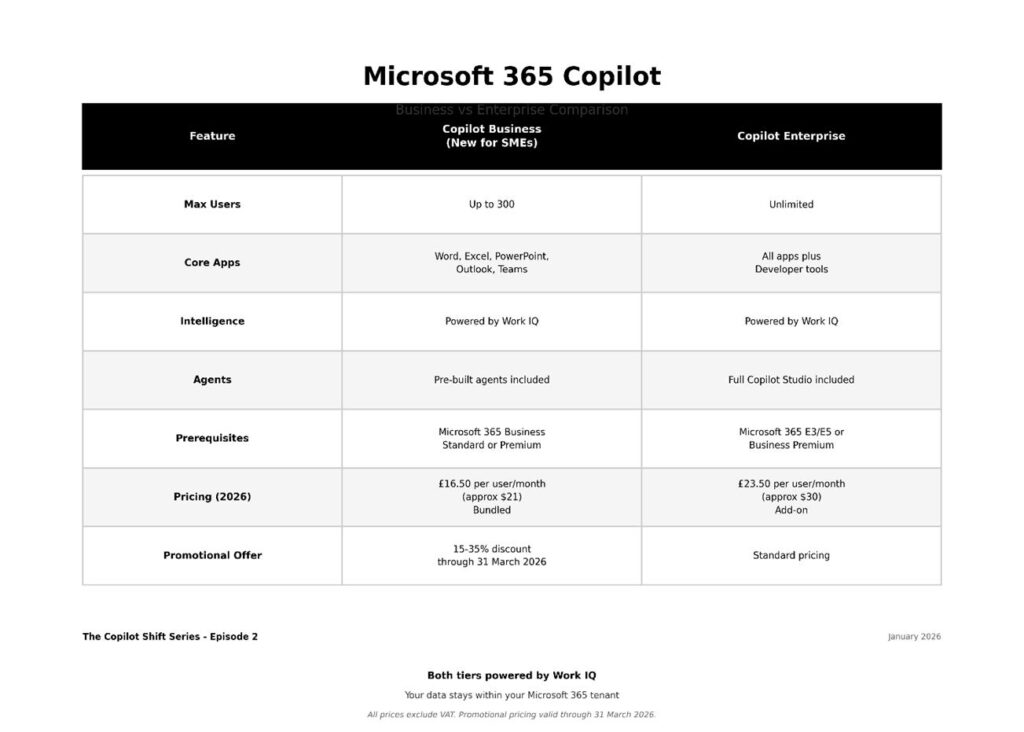
What makes this “Business” tier fundamentally different:
1. Work IQ Integration: This is the game-changer. Work IQ is the intelligence layer (announced at Microsoft Ignite 2025) that understands:
- Your work data—emails, files, meetings, chats
- Your memory—your style, preferences, habits, workflows
- Inference—making valuable connections across your entire Microsoft 365 tenant
2. Data Security: Your business data stays within your Microsoft 365 tenant. Copilot respects your existing permissions. An intern cannot use AI to “see” confidential executive documents.
3. Teams Integration: Copilot in Teams is where massive productivity gains happen where you get meeting summaries, action items, catching up on missed conversations.
4. Enterprise-Grade Controls: Admin controls, usage analytics, compliance features, and data governance tools.
🚀 The “Hidden” Copilots You Already Own
Beyond the licences, Copilot is now woven into the “shell” of your workday. You may even already have access to these:
Copilot in Windows: Built into your Windows 11 taskbar. It controls your PC settings (e.g., “Switch to dark mode”) and summarises local files. Works with the free Copilot account.
Copilot in Edge: Available in your browser sidebar. In October 2025, Microsoft launched Copilot Mode in Edge which is a more immersive AI browser experience that can:
- Summarise long PDFs and web pages
- Compare competitor websites across multiple tabs
- Draft LinkedIn posts or emails
- Provide contextual assistance while browsing
Copilot Mobile: The unified app for iOS and Android. Includes Copilot Voice, allowing you to have voice conversations and get a “morning briefing” of your emails (though usage limits apply on free tier). In 2026, mobile Copilot integrates with your calendar and notifications for a more connected experience.
Important note: These “hidden” Copilots use the free/personal tier by default. To get Work IQ integration and business data access, you need a Microsoft 365 Copilot Business or Enterprise licence.
🎯 So, Which One Does an SME Actually Need?
Here is the simple 2026 rule of thumb:
Your Situation | Recommended Option
Personal tasks only | Free Copilot (copilot.microsoft.com)
Individual/family use, light productivity | Microsoft 365 Premium
Solo trader with simple needs (no Teams) | Microsoft 365 Premium (with caution)
Any business with 2+ people | Microsoft 365 Copilot Business
Business needing collaboration & data security | Microsoft 365 Copilot Business
Why Business is essential for SMEs:
The Business version is the only one that uses Work IQ. It connects the dots between your Tuesday morning meeting, the spreadsheet you updated on Wednesday, and the email you need to write on Thursday. It respects your company’s security permissions and governance policies.
You can think of it this way:
- Free/Premium = Individual productivity (disconnected from your business)
- Microsoft 365 Business = Organisational intelligence (connected to your business data)
📋 What You Need BEFORE You Can Buy Copilot Business
Critical prerequisite: You cannot buy Microsoft 365 Copilot Business standalone. You must already have one of these qualifying base subscriptions:
✅ Microsoft 365 Business Standard
✅ Microsoft 365 Business Premium
✅ Microsoft 365 Apps for Business
✅ Office 365 E3/E5 (for Enterprise Copilot)
Minimum requirement: 1 licence (though it’s designed for organisations up to 300 users)
What this means:
1. Check your current Microsoft 365 subscription
2. If you’re on Business Basic, you’ll need to upgrade to Business Standard first
3. Then you can add Copilot Business on top
UK pricing context (as of January 2026):
- Microsoft 365 Business Standard: ~£10/user/month
- + Copilot Business: ~£16.50/user/month
- Total: ~£26.50/user/month (with promotional pricing through March 2026, this can be lower)
⚠️ Common Misconceptions to Avoid
Misconception 1: “I’ll just use the free version for business tasks”
❌ Free Copilot cannot access your SharePoint, Teams, or business email
❌ No admin controls or compliance features
❌ Not suitable for confidential business data
Misconception 2: “Microsoft 365 Premium is the same as Business”
❌ Premium has no Work IQ
❌ No Teams AI integration
❌ Designed for families, not businesses
Misconception 3: “I can buy Copilot Business by itself”
❌ Requires qualifying base Microsoft 365 subscription
❌ Cannot be purchased standalone
Misconception 4: “All Copilots are equally secure”
❌ Only Microsoft 365 Copilot (Business/Enterprise) keeps data within your tenant boundaries
❌ Only Business/Enterprise respects your organisation’s security and permissions structure
🧭 Episode 2 Summary
The ecosystem is broad, but the choice for SMEs is now clearer than ever:
1. Free Copilot = Personal tasks, no business data integration
2. Microsoft 365 Premium = Individual productivity, not suitable for businesses
3. Microsoft 365 Copilot Business = Organisational intelligence with Work IQ
For SMEs, Copilot Business is the only option that delivers true business value:
- Connects to your business data via Work IQ
- Integrates with Teams for collaboration
- Respects security and governance
- Provides admin controls and compliance
December 2025 update: With the new Business pricing tier (£16.50/user/month) and promotional discounts through 31 March 2026, Copilot is now more accessible than ever to SMEs.
However: You cannot buy it until you’ve checked your base licence requirements and—critically—prepared your data governance. Which brings us to…
📘 Coming in Episode 3
Licensing & Data Preparation – What You Need Before You Start
It’s worth noting that understanding what you have and what you need to proceed, particularly for larger companies there are many health check or assessments services available from MSP’s. Before you buy a single Copilot licence, you need to understand:
- Whether your current Microsoft 365 subscription qualifies
- How to assess your data governance readiness
- Why 40% of organisations delay rollouts for 3+ months
- The “over-sharing trap” that can expose confidential data
Warning: Do NOT buy Copilot licences until you’ve read Episode 3. Data governance preparation is not optional and makes the difference between successful deployment and a security incident.